Every industrial facility faces the same quiet danger: unexpected machine startup during maintenance. One misstep—one unlabeled valve, one missed signature—can lead to catastrophic injury. The lockout tagout (LOTO) sign out sheet stands between routine service and disaster. Yet, many teams still rely on handwritten notes, inconsistent forms, or no formal process at all.
A well-designed lockout tagout sign out sheet template isn’t just paperwork—it’s a legal requirement under OSHA 29 CFR 1910.147 and a frontline defense for worker safety. This guide breaks down what makes a sign out sheet effective, how to use it correctly, and where to get reliable, customizable templates.
What Is a Lockout Tagout Sign Out Sheet?
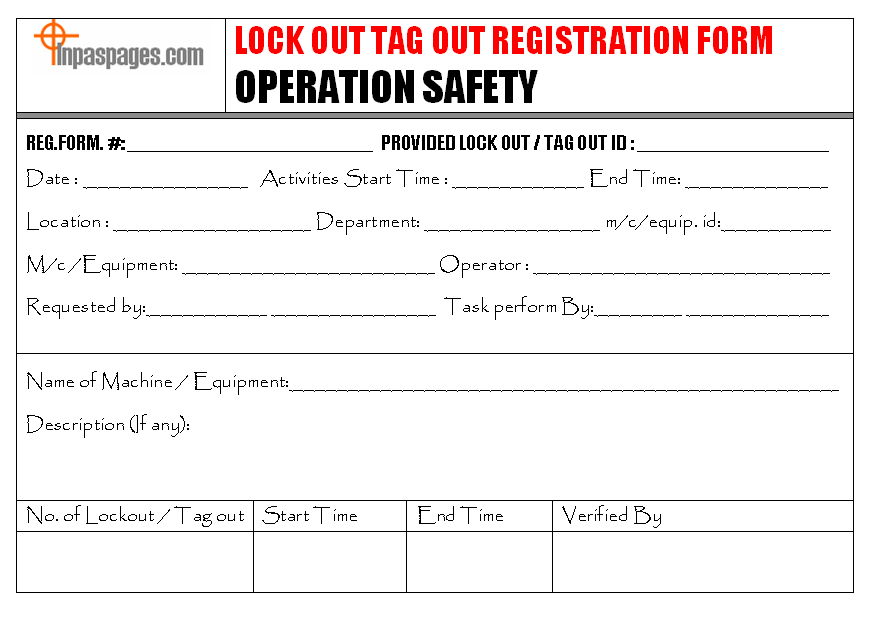
A lockout tagout sign out sheet records who applied energy control devices, when, and for which equipment. It serves as a live audit trail during maintenance, ensuring every authorized employee checks in and out of a controlled procedure.
Unlike a standard LOTO procedure document, the sign out sheet is used in real time. It logs:
- Name and ID of the authorized employee
- Time and date of lock application
- Equipment or energy source isolated
- Type of energy controlled (electrical, hydraulic, pneumatic, etc.)
- Supervisor verification
- Removal details upon completion
Think of it as a shared responsibility dashboard. If six technicians are working on a conveyor system, the sign out sheet shows exactly who locked what—and who hasn’t removed their lock.
Why a Template Matters—And Where Most Companies Fail
Off-the-shelf templates are tempting. Free PDFs circulate online, pulled from outdated safety manuals or copied between departments. But generic forms often miss critical fields or include irrelevant sections, leading to confusion or noncompliance.
Common flaws in poorly designed LOTO sign out sheets:
- Missing employee ID fields
- No space for equipment-specific energy sources
- Lack of removal verification
- Missing dual-language support (if needed)
- No integration with existing permit-to-work systems
A strong template should be facility-specific, easy to read, and mandatory at every step of the process. It must survive real-world conditions—grease, rain, rushed shifts—without becoming illegible.
Essential Elements of an Effective Sign Out Sheet
Not all templates are created equal. Here’s what every high-functionality lockout tagout sign out sheet must include:
1. Header with Facility and Department Info Clearly identify the plant, zone, or line. This avoids confusion in multi-site operations.

2. Equipment Identification Include make, model, serial number, and location. Vague entries like “Pump #3” are insufficient.
3. Authorized Employee Section List full name, employee ID, and contact method. Use checkboxes or signature lines—never initials alone.
4. Lock and Tag Details Record lock number, tag ID, and energy type (e.g., 480V electrical, steam line). This enables quick audits.
5. Time Stamps for Application and Removal Document start and end times. OSHA requires removal to be done by the same employee who applied the lock—unless under strict shift change protocols.
6. Supervisor Verification A designated safety lead must approve both lock application and removal.
7. Notes and Exceptions Space for special conditions—e.g., “Hydraulic pressure not fully bled,” or “Interlock bypassed for testing.”
Real-World Use Case: How a Sign Out Sheet Prevented a Near-Miss
At a Midwest food processing plant, maintenance was scheduled on a large mixer. Three technicians applied locks and began disassembly. Midway, a fourth technician arrived late and added his lock without updating the sign out sheet.
When the lead supervisor cleared the system for restart, he reviewed the sign out sheet and noticed a discrepancy: four locks were in place, but only three names were signed. He halted the restart and located the fourth worker—still inside the mixing chamber.
The sign out sheet caught the oversight. Without it, the result could have been fatal.
This case underscores a key rule: no lock is invisible. No worker is unaccounted for. The sheet enforces visibility and accountability.
Downloadable Templates: 5 Reliable Sources
Don’t start from scratch. Use these trusted sources to access customizable, OSHA-aligned lockout tagout sign out sheet templates:
| Source | Format | Customizable? | Key Features |
|---|---|---|---|
| OSHA.gov | PDF, Word | Yes | Official compliance alignment, minimal design |
| Creative Safety Supply | PDF, Excel | Yes | Bilingual options, color-coded sections |
| SafetyCulture (iAuditor) | Digital template | Yes | Mobile-friendly, cloud sync, real-time logs |
| Seton | PDF, editable | Yes | Pre-printed carbon copy options for duplicates |
| NIST (Manufacturing Extension) | Word, Excel | Yes | Industry-specific variants (chemical, auto, etc.) |
Pro Tip: Pair a printable template with a digital backup. Scanned copies stored in a shared drive create a retrievable audit trail for inspections.
Common Mistakes That Undermine LOTO Sign Out Sheets
Even with a good template, execution failures happen. Watch for these recurring issues:
Mistake 1: Allowing Blank Fields A sheet missing start times or lock IDs is incomplete. Treat blanks as red flags.
Mistake 2: Using Shared Logins or Generic Names “Maintenance Team” or “Night Shift” are invalid entries. Every lock must trace to one person.
Mistake 3: Storing Sheets in Inaccessible Locations If the form is locked in an office while work happens on the floor, it’s useless. Use waterproof clipboards near equipment.
Mistake 4: Skipping Removal Sign-Off
Many teams document lock application but forget to log removal. This breaks the chain of custody.
Mistake 5: Not Training Employees on the Sheet’s Purpose Workers may treat it as “just paperwork” unless trained on how it protects them.
Digital vs. Paper: Which Format Wins?
The debate isn’t about technology—it’s about reliability.
Paper sign out sheets work without power, resist hacking, and are universally understood. But they can be lost, damaged, or altered.
Digital systems offer real-time updates, automated reminders, and integration with CMMS (Computerized Maintenance Management Systems). However, they depend on devices and network access.
Best practice: Hybrid approach. Use a printed master sheet for on-site use and a digital twin for record-keeping. This satisfies OSHA’s documentation requirements and supports internal audits.
How to Implement a LOTO Sign Out Process in 4 Steps
Adopting a template is just the start. True safety comes from process.
Step 1: Customize the Template Add your company logo, facility codes, and specific equipment types. Remove irrelevant fields.
Step 2: Train Authorized Employees Conduct hands-on drills. Have workers complete mock sign out sheets during safety sessions.
Step 3: Integrate with LOTO Procedures The sign out sheet must be referenced in your formal energy control program. Link it to equipment-specific LOTO instructions.
Step 4: Audit Monthly Review 3–5 completed sheets each month. Check for completeness, accuracy, and adherence to protocol.
Example: A paper mill reduced LOTO incidents by 78% within six months after introducing monthly audits and a revised sign out sheet.
Final Thoughts: Treat the Sign Out Sheet Like a Safety Contract
A lockout tagout sign out sheet template is more than a form—it’s a promise. A promise that every worker will be seen, accounted for, and protected.
The right template, used correctly, eliminates ambiguity. It turns a complex safety procedure into a clear, step-by-step record. And in high-risk environments, clarity saves lives.
Download a proven template today. Customize it. Train your team. And never let a machine restart without verifying every name on the sheet.
Frequently Asked Questions
What should I do if an employee forgets to sign out? Do not remove any locks. Contact the employee immediately. If unreachable, follow your employer’s established policy for authorized lock removal—typically requiring management approval and verification that the worker is clear of the equipment.
Can one sign out sheet cover multiple machines? Only if they’re part of the same energy control procedure. Otherwise, each machine or energy source requires its own sheet to avoid confusion.
How long should I keep completed sign out sheets? OSHA requires documentation of LOTO procedures and training records, but not necessarily sign out sheets. However, retaining them for at least one year is a best practice for incident investigations and audits.
Who can remove a lock if the employee is off-site? Under OSHA 1910.147(d)(6), a lock may be removed by a designated representative following a documented, alternative procedure that includes verification that the employee is not in danger.
Should contractors use the same sign out sheet? Yes. Contractors must be integrated into your LOTO program. They should sign the same sheet using a separate section or line item labeled “Contractor.”
Can I use a whiteboard instead of a printed sheet? No. Whiteboards aren’t durable or auditable. OSHA requires written procedures and records. Use a physical or digital form that can be preserved.
Are digital sign out sheets OSHA-compliant? Yes, as long as they’re secure, accurate, and accessible for inspection. Digital logs must be as reliable as paper records.
FAQ
What should you look for in Lockout Tagout Sign Out Sheet Template Guide? Focus on relevance, practical value, and how well the solution matches real user intent.
Is Lockout Tagout Sign Out Sheet Template Guide suitable for beginners? That depends on the workflow, but a clear step-by-step approach usually makes it easier to start.
How do you compare options around Lockout Tagout Sign Out Sheet Template Guide? Compare features, trust signals, limitations, pricing, and ease of implementation.
What mistakes should you avoid? Avoid generic choices, weak validation, and decisions based only on marketing claims.
What is the next best step? Shortlist the most relevant options, validate them quickly, and refine from real-world results.